> ## Documentation Index
> Fetch the complete documentation index at: https://docs.manifestfinancial.com/llms.txt
> Use this file to discover all available pages before exploring further.
# Connect Invites
 # Overview
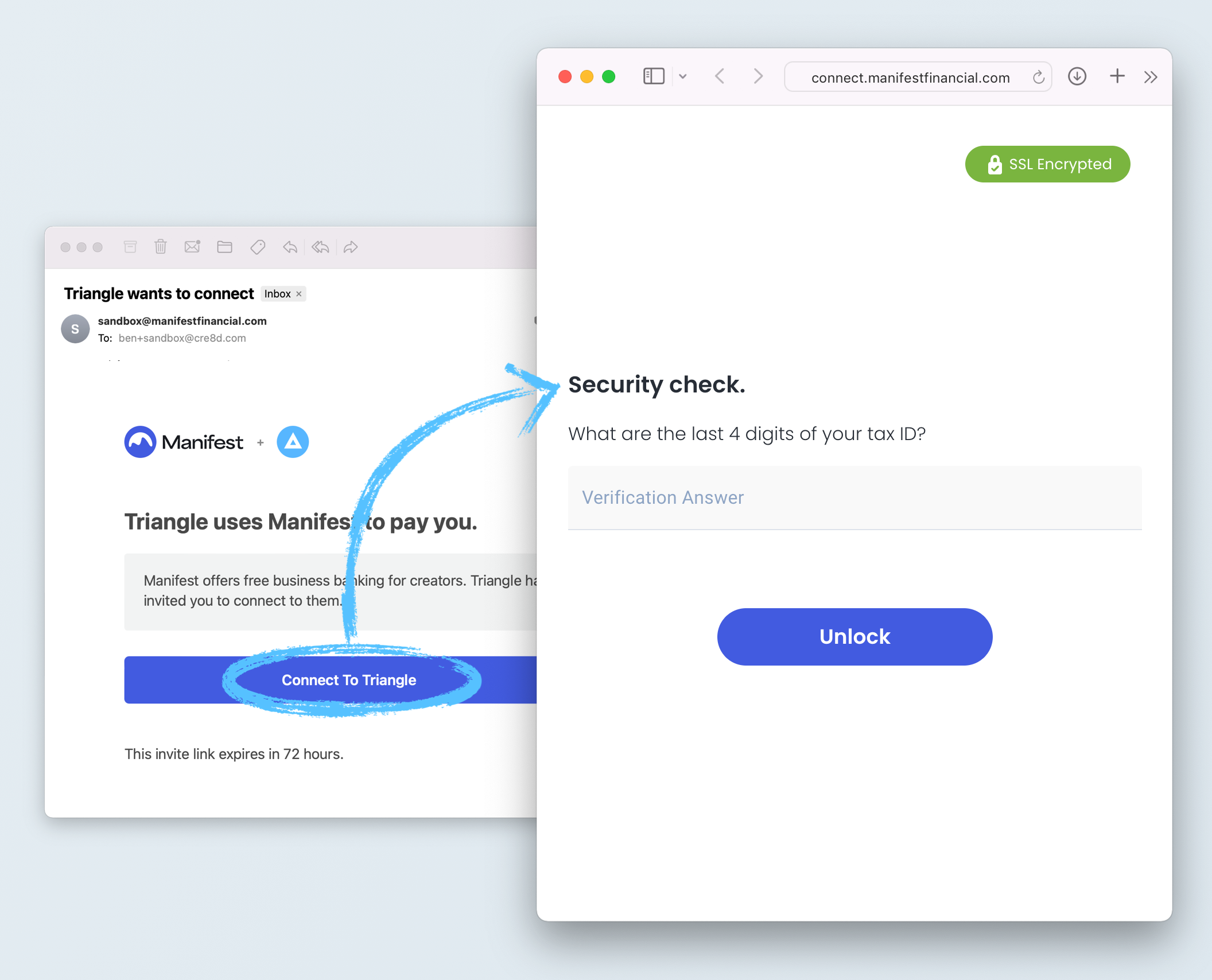
Connect Invites function like [Connect Links](/platform/connect/links), but they add an additional layer of verification, allowing them to be used in stand alone scenarios like personalized emails.
Connect Invites differ from Connect Links in a 2 important ways:
* Connect Invites allow you to prompt the user for verification information only they should know. This verification info is set when you create the account connection. Some examples include:
* Last 4 of SSN
* Account Number or User ID with your organization
* The current bank account number they have on file with your organization
* Connect Invites expire 72 hours after creation (vs 10 minutes for Connect Links) or after 3 failed verification attempts.
**Different in Sandbox**
# Overview
Connect Invites function like [Connect Links](/platform/connect/links), but they add an additional layer of verification, allowing them to be used in stand alone scenarios like personalized emails.
Connect Invites differ from Connect Links in a 2 important ways:
* Connect Invites allow you to prompt the user for verification information only they should know. This verification info is set when you create the account connection. Some examples include:
* Last 4 of SSN
* Account Number or User ID with your organization
* The current bank account number they have on file with your organization
* Connect Invites expire 72 hours after creation (vs 10 minutes for Connect Links) or after 3 failed verification attempts.
**Different in Sandbox**
Remember that sandbox follows special rules about [sending emails](/reference/testing-in-sandbox#emails).
***
# Methods
**`POST` /connect-invite**
Link your creators to Connect to activate their connection to you.
## Body Parameters
ID of the account connection to be onboarded.
If true, Manifest will send your account connection an invite email. Send `false` to turn off the Manifest-powered email invite, and use the returned `url` to send your own invite. (Default: `true`)
## Example
```json Request theme={null}
// POST /connect-invite
{
"account_connection": "acon_XXXXX",
}
```
```json Response theme={null}
{
"url": "https://connect.manifestfinancial.com/invite/cYnAmfVT6zk7kFXjxkYzHVyMMneZn0VpRek0",
"created_at": "2024-01-23T22:39:30.779Z",
"expires_at": "2024-01-23T22:49:30.778Z"
}
```
***
# Properties
URL that directs your user to their personalized invite. This URL is safe to email to your user.
Date this Connect invite will automatically expire. (Set to 72 hours after object is created.) Formatted as [ISO 8601 date/time string](https://www.w3.org/TR/NOTE-datetime).